You can embed Csound in PD via the external csoundapi~, which has been written by Victor Lazzarini. This external is part of the Csound distribution. For instance, on OSX, you find it in the following path:
/Library/Frameworks/CsoundLib.framework/Versions/5.2/Resources/PD/csoundapi~.pd_darwin
Put this file in a folder which is in PD's search path. For PD-extended, it's by default ~/Library/Pd. But you can put it anywhere. Just make sure that the location is specified in PD's Preferences > Path... menu.
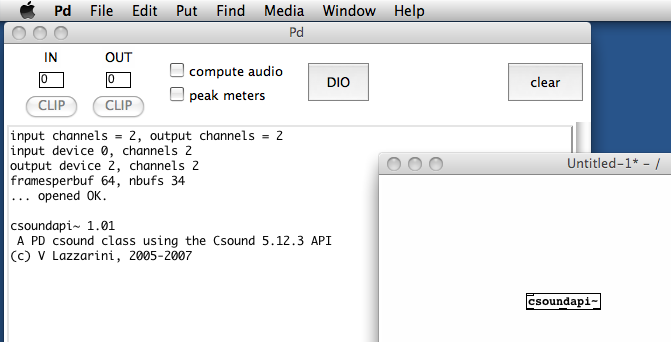
If this is done, you should be able to call the csoundapi~ object in PD. Just open a PD window, put a new object, and type in "csoundapi~":
You can send control data from PD to your Csound instrument via the keyword "control" in a message box. In your Csound code, you must receive the data via invalue or chnget. This is a simple example:
EXAMPLE 09A01.csd
<CsoundSynthesizer>
<CsOptions>
</CsOptions>
<CsInstruments>
;Example by Joachim Heintz

sr = 44100
nchnls = 2
0dbfs = 1
ksmps = 8

giSine    ftgen     0, 0, 2^10, 10, 1

instr 1
kFreq     invalue   "freq"
kAmp      invalue   "amp"
aSin      oscili    kAmp, kFreq, giSine
          outs      aSin, aSin
endin

</CsInstruments>
<CsScore>
i 1 0 10000
</CsScore>
</CsoundSynthesizer>
Save this file under the name "control.csd". Save a PD window in the same folder and create the following patch:
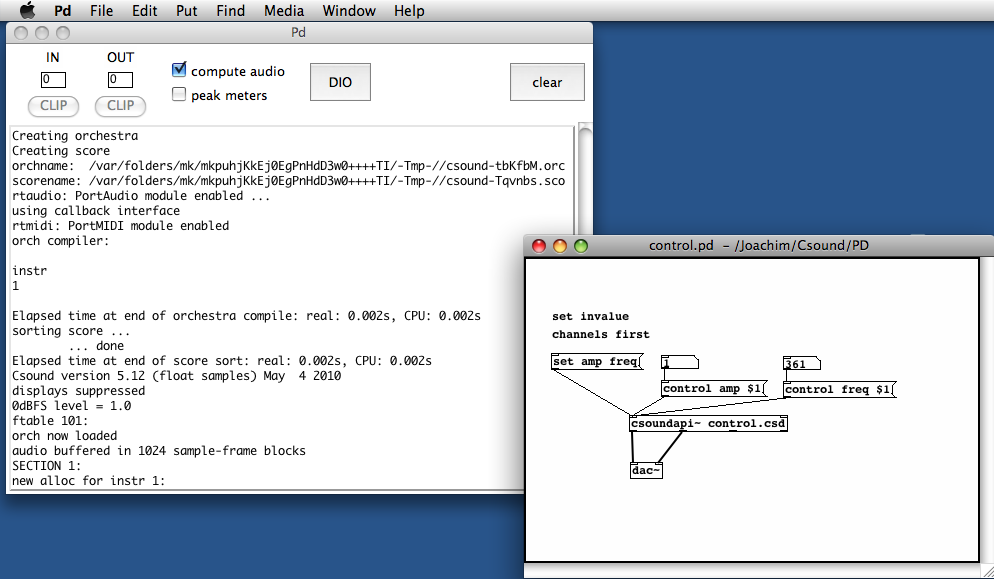
Note that for invalue channels, you first must register these channels by a "set" message.
As you see, the first two outlets of the csoundapi~ object are the signal outlets for the audio channels 1 and 2. The third outlet is an outlet for control data (not used here, see below). The rightmost outlet sends a bang when the score has been finished.
Audio streams from PD can be received in Csound via the inch opcode. As many input channels there are, as many audio inlets are created in the csoundapi~ object. The following CSD uses two audio inputs:
EXAMPLE 09A02.csd
<CsoundSynthesizer>
<CsOptions>
</CsOptions>
<CsInstruments>
;Example by Joachim Heintz
sr = 44100
0dbfs = 1
ksmps = 8
nchnls = 2

instr 1
aL        inch      1
aR        inch      2
kcfL      randomi   100, 1000; center frequency
kcfR      randomi   100, 1000; for band pass filter
aFiltL    butterbp  aL, kcfL, kcfL/10
aoutL     balance   aFiltL, aL
aFiltR    butterbp  aR, kcfR, kcfR/10
aoutR     balance   aFiltR, aR
          outch     1, aoutL
          outch     2, aoutR
endin

</CsInstruments>
<CsScore>
i 1 0 10000
</CsScore>
</CsoundSynthesizer>
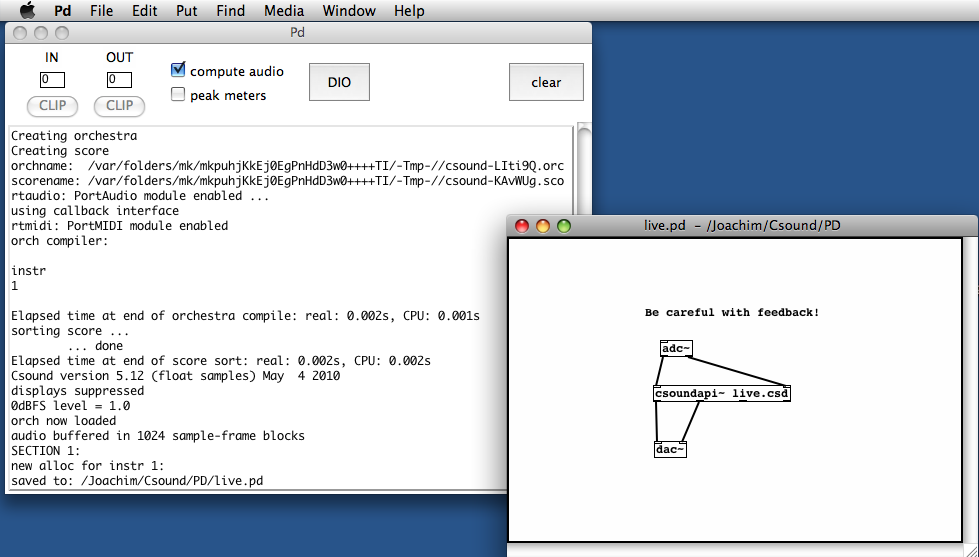
The corresponding PD patch is extremely simple:
The csoundapi~ object receives MIDI data via the keyword "midi". Csound is able to trigger instrument instances in receiving a "note on" message, and turning them off in receiving a "note off" message (or a note-on message with velocity=0). So this is a very simple way to build a synthesizer with arbitrary polyphonic output:

This is the corresponding midi.csd. It must contain the options -+rtmidi=null -M0 in the <CsOptions> tag. It's an FM synth which changes the modulation index according to the verlocity: the more you press a key, the higher the index, and the more partials you get. The ratio is calculated randomly between two limits which can be adjusted.
EXAMPLE 09A03.csd
<CsOptions>
-+rtmidi=null -M0
</CsOptions>
<CsoundSynthesizer>
<CsInstruments>
;Example by Joachim Heintz
sr      =  44100
ksmps   =  8
nchnls  =  2
0dbfs = 1

giSine    ftgen     0, 0, 2^10, 10, 1

instr 1
iFreq     cpsmidi   ;gets frequency of a pressed key
iAmp      ampmidi   8;gets amplitude and scales 0-8
iRatio    random    .9, 1.1; ratio randomly between 0.9 and 1.1
aTone     foscili   .1, iFreq, 1, iRatio/5, iAmp+1, giSine; fm
aEnv      linenr    aTone, 0, .01, .01; for avoiding clicks at the end of a note
          outs      aEnv, aEnv
endin

</CsInstruments>
<CsScore>
f 0 36000; play for 10 hours
e
</CsScore>
</CsoundSynthesizer>
Score events can be sent from PD to Csound by a message with the keyword event. You can send any kind of score events, like instrument calls or function table statements. The following example triggers Csound's instrument 1 whenever you press the message box on the top. Different sounds can be selected by sending f events (building/replacing a function table) to Csound.
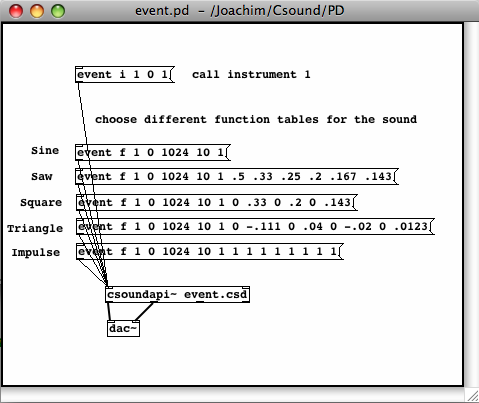
EXAMPLE 09A04.csd
<CsoundSynthesizer>
<CsOptions>
</CsOptions>
<CsInstruments>
;Example by Joachim Heintz
sr = 44100
ksmps = 8
nchnls = 2
0dbfs = 1

          seed      0; each time different seed
giSine    ftgen     1, 0, 2^10, 10, 1; function table 1

instr 1
iDur      random    0.5, 3
p3        =         iDur
iFreq1    random    400, 1200
iFreq2    random    400, 1200
idB       random    -18, -6
kFreq     linseg    iFreq1, iDur, iFreq2
kEnv      transeg   ampdb(idB), p3, -10, 0
aTone     oscili    kEnv, kFreq, 1
          outs      aTone, aTone
endin

</CsInstruments>
<CsScore>
f 0 36000; play for 10 hours
e
</CsScore>
</CsoundSynthesizer>
If you want Csound to give any sort of control data to PD, you can use the opcodes outvalue or chnset. You will receive this data at the second outlet from the right of the csoundapi~ object. This is a simple example:
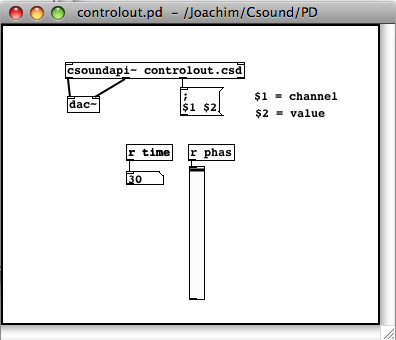
EXAMPLE 09A05.csd
<CsoundSynthesizer>
<CsOptions>
</CsOptions>
<CsInstruments>
;Example by Joachim Heintz

sr = 44100
nchnls = 2
0dbfs = 1
ksmps = 8

instr 1
ktim      times
kphas     phasor    1
          outvalue  "time", ktim
          outvalue  "phas", kphas*127
endin

</CsInstruments>
<CsScore>
i 1 0 30
</CsScore>
</CsoundSynthesizer>
Make sure that the Csound vector size given by the ksmps value, is not larger than the internal PD vector size. It should be a power of 2. I'd recommend to start with ksmps=8. If there are performance problems, try to increase this value to 16, 32, or 64.
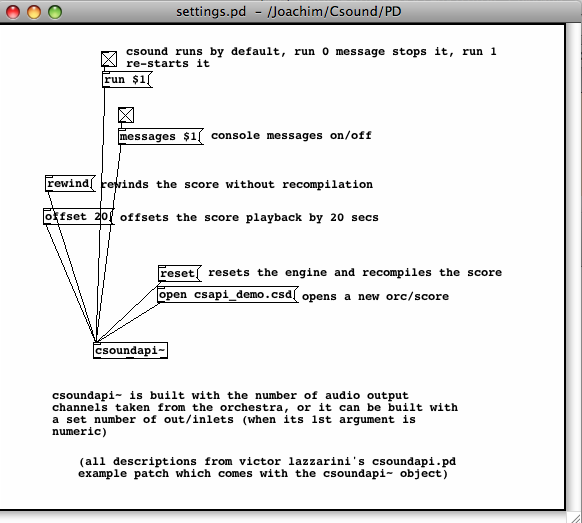
The csoundapi~ object runs by default if you turn on audio in PD. You can stop it by sending a "run 0" message, and start it again with a "run 1" message.
You can recompile the .csd file of a csoundapi~ object by sending a "reset" message.
By default, you see all the messages of Csound in the PD window. If you don't want to see them, send a "message 0" message. "message 1" prints the output again.
If you want to open a new .csd file in the csoundapi~ object, send the message "open", followed by the path of the .csd file you want to load.
A "rewind" message rewinds the score without recompilation. The message "offset", followed by a number, offsets the score playback by an amount of seconds.